AI Tools
15 Automation AI Tools: Hub of all workflow solutions


In today’s fast-moving world, automation tools powered by artificial intelligence are becoming essential for businesses and individuals. These tools help you save time, reduce mistakes, and focus on more important tasks. Whether you’re a small business owner, freelancer, or part of a large company, the right automation tool can make your work much easier.
This article explores 15 powerful automation AI tools that can transform how you handle daily tasks. Each tool offers unique features, and we’ll look at both the good and challenging aspects of using them.
1. n8n
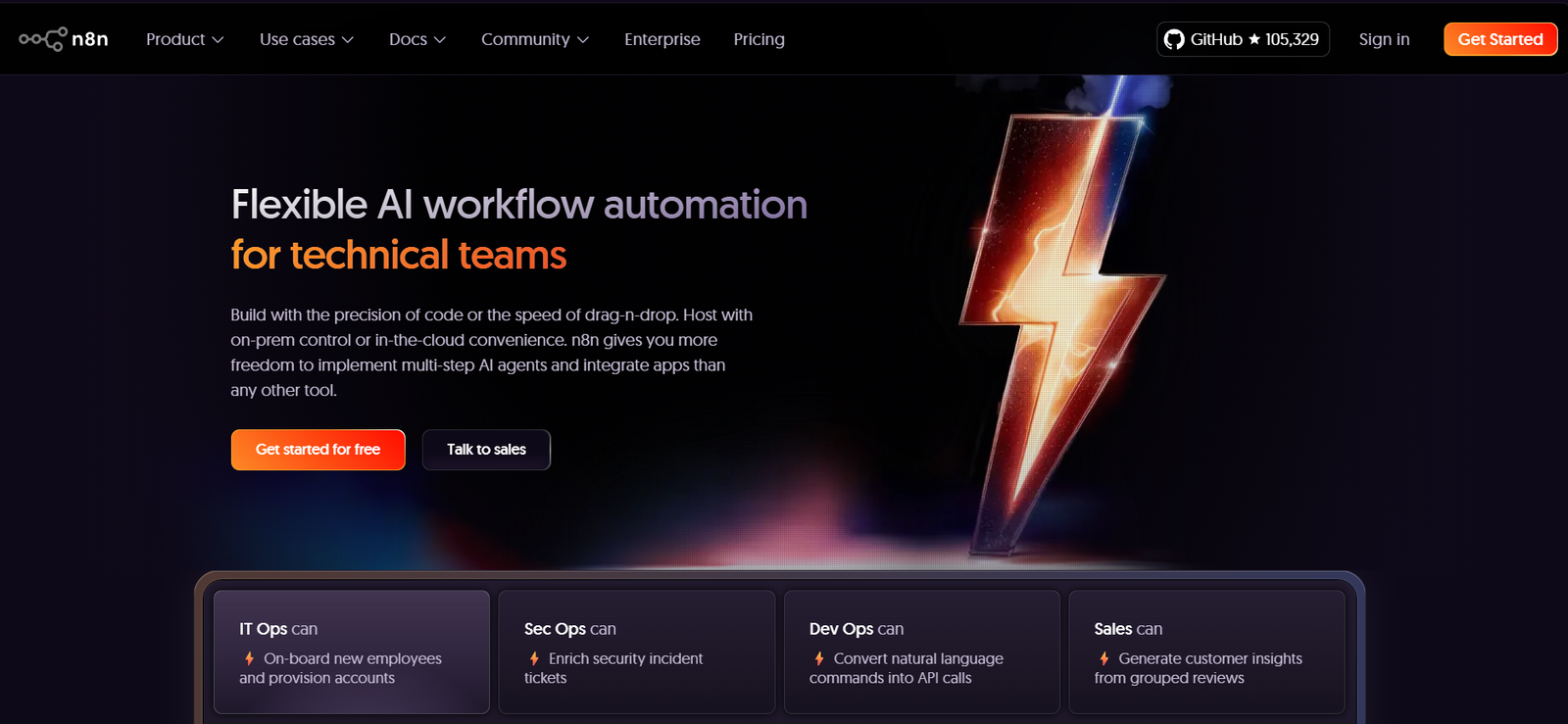
n8n is a workflow automation tool that helps you connect different apps and services without needing to write complex code. Think of it as a digital assistant that can move information between your favorite tools automatically.
What it does: n8n lets you create automated workflows by connecting various apps like Google Sheets, Slack, email services, and hundreds of other tools. When something happens in one app, n8n can automatically trigger actions in other apps.
n8n
Pros:
- Free to use with open-source options
- Works with over 200 different apps and services
- Easy drag-and-drop interface for creating workflows
- Can be customized heavily for specific needs
- Strong community support and regular updates
Cons:
- Can be overwhelming for complete beginners
- Requires some technical knowledge for advanced features
- Self-hosting might be challenging for non-technical users
- Limited customer support for free version
2. Browse AI
Browse AI is a smart web scraping tool that can extract information from websites automatically. It’s like having a virtual assistant that can visit websites and collect data for you.
What it does: This tool can monitor websites for changes, extract data from web pages, and turn any website into a structured data source. It’s perfect for tracking prices, monitoring competitors, or gathering research information.
Pros:
- No coding skills needed to set up data extraction
- Can handle dynamic websites that change frequently
- Automatically adapts to website layout changes
- Offers pre-built templates for common tasks
- Works on both desktop and mobile
Cons:
- Can be expensive for large-scale data extraction
- Some websites may block automated access
- Learning curve for complex extraction tasks
- Limited customization options for advanced users
3. Thoughtly
Thoughtly is an AI-powered customer service automation tool that creates intelligent chatbots and virtual assistants for businesses.
What it does: Thoughtly builds conversational AI systems that can handle customer inquiries, book appointments, answer questions, and provide support 24/7. It uses natural language processing to understand and respond to customers naturally.
Pros:
- Creates human-like conversations with customers
- Available 24/7 without breaks
- Can handle multiple customers simultaneously
- Reduces need for human customer service staff
- Learns and improves from interactions
Cons:
- May struggle with very complex or unique questions
- Setup and training can be time-consuming
- Customers might prefer human interaction
- Requires ongoing maintenance and updates
4. aiApply
aiApply is an artificial intelligence tool designed to help job seekers automate their application process and improve their chances of getting hired.
What it does: This tool helps create personalized resumes, cover letters, and job applications. It can also automatically apply to relevant job postings and track application progress.
Pros:
- Saves significant time in job searching
- Creates customized applications for each job
- Tracks application status automatically
- Improves resume quality with AI suggestions
- Can apply to multiple jobs quickly
Cons:
- May lack personal touch in applications
- Some employers prefer manually written applications
- Subscription costs can add up over time
- Risk of applying to unsuitable positions
5. Hexomatic
Hexomatic is a work automation platform that helps businesses automate repetitive tasks without needing programming skills.
What it does: Hexomatic offers over 100 ready-made automation tools for tasks like data extraction, content creation, lead generation, and market research. Users can combine these tools to create powerful automated workflows.
Pros:
- Large library of pre-built automation tools
- No coding required for most tasks
- Can process large amounts of data quickly
- Integrates with popular business tools
- Affordable pricing for small businesses
Cons:
- Can be complex to set up advanced workflows
- Limited customization for specific needs
- Learning curve for new users
- Some features require higher-tier plans
6. Snoooz
Snoooz is an email automation tool that helps manage email scheduling and follow-ups intelligently.
What it does: Snoooz allows users to schedule emails, set automatic follow-ups, and manage email campaigns with AI-powered timing optimization. It helps ensure important emails don’t get forgotten.
Pros:
- Improves email response rates
- Prevents important emails from being forgotten
- Easy to integrate with existing email systems
- Smart timing suggestions for better engagement
- Simple interface that’s easy to learn
Cons:
- Limited to email automation only
- May not work with all email providers
- Can feel impersonal for important communications
- Subscription required for advanced features
7. Harpa AI
Harpa AI is a browser extension that brings AI automation directly to your web browsing experience.
What it does: This tool can summarize web pages, extract data, monitor websites for changes, and automate various web-based tasks. It works as you browse, making web research and data collection much faster.
Pros:
- Works directly in your browser
- Can summarize long articles quickly
- Monitors websites for changes automatically
- Helps with research and data collection
- Free version available with basic features
Cons:
- Limited to browser-based tasks
- May slow down browsing on older computers
- Privacy concerns with data processing
- Advanced features require paid subscription
8. Qodex
Qodex is an AI-powered code automation and development tool that helps programmers work more efficiently.
What it does: Qodex assists with code generation, bug detection, testing, and documentation. It can understand what you’re trying to build and suggest code improvements or complete functions automatically.
Pros:
- Speeds up software development significantly
- Helps catch bugs before they become problems
- Generates documentation automatically
- Supports multiple programming languages
- Reduces repetitive coding tasks
Cons:
- Requires programming knowledge to use effectively
- May generate code that needs human review
- Can be expensive for individual developers
- Dependency on AI suggestions might reduce learning
9. BatchTable
BatchTable is a data processing automation tool that helps handle large amounts of information efficiently.
What it does: This tool can clean, organize, and process data from various sources automatically. It’s particularly useful for businesses that deal with customer data, inventory information, or research data.
Pros:
- Handles large datasets quickly
- Reduces manual data entry errors
- Can clean and organize messy data
- Integrates with common business tools
- Saves hours of manual work
Cons:
- Learning curve for complex data operations
- May require some technical knowledge
- Limited visualization options
- Can be costly for small-scale use
10. Make
Make (formerly Integromat) is a visual automation platform that connects apps and services to automate workflows.
What it does: Make allows users to create automated scenarios that connect different applications. When something happens in one app, Make can automatically trigger actions in other connected apps.
Pros:
- Visual workflow builder is easy to understand
- Connects with thousands of popular apps
- Powerful automation capabilities
- Good documentation and tutorials
- Free tier available for basic use
Cons:
- Can become expensive as usage grows
- Complex scenarios require technical knowledge
- Learning curve for advanced features
- Troubleshooting can be challenging
11. CodeDesign
CodeDesign is an AI-powered web design and development automation tool.
What it does: This tool helps create websites and web applications using artificial intelligence. It can generate layouts, write code, and optimize designs based on user requirements.
Pros:
- Creates professional websites quickly
- No coding knowledge required for basic sites
- Responsive designs that work on all devices
- AI suggests improvements and optimizations
- Faster than traditional web development
Cons:
- Limited customization for unique designs
- May produce generic-looking websites
- Advanced features require technical knowledge
- Ongoing subscription costs
12. Hexofy
Hexofy is a web scraping automation tool that extracts data from websites with just one click.
What it does: Hexofy allows users to capture data from any website by simply pointing and clicking. It can extract text, images, links, and other information without needing to write code.
Pros:
- Extremely easy to use
- Works with most websites
- Can capture data in various formats
- No programming skills needed
- Quick setup and execution
Cons:
- Limited to simple data extraction
- May not work with complex websites
- Can be blocked by some websites
- Limited data processing capabilities
13. Hexometer
Hexometer is a website monitoring automation tool that keeps track of website performance and issues.
What it does: This tool continuously monitors websites for problems like broken links, slow loading times, security issues, and content changes. It alerts users when problems are detected.
Pros:
- Prevents website downtime
- Monitors multiple aspects of website health
- Sends instant alerts when issues occur
- Easy to set up and configure
- Helps maintain professional online presence
Cons:
- Limited to website monitoring only
- Can generate false alarms sometimes
- Subscription required for comprehensive monitoring
- May not catch all types of website issues
14. Hexowatch
Hexowatch is a website change detection tool that monitors web pages for updates and modifications.
What it does: Hexowatch tracks changes on websites and sends notifications when content is updated. It’s useful for monitoring competitors, tracking price changes, or staying updated on important websites.
Pros:
- Detects even small changes on websites
- Can monitor multiple pages simultaneously
- Customizable notification settings
- Helps stay updated on important information
- Visual change detection makes it easy to spot updates
Cons:
- May detect irrelevant changes
- Can generate too many notifications
- Limited action options when changes are detected
- Subscription required for extensive monitoring
15. Procys
Procys is an AI-powered document processing automation tool that handles invoices, receipts, and other business documents.
What it does: Procys automatically extracts information from business documents, processes invoices, manages receipts, and integrates with accounting systems. It eliminates manual data entry for financial documents.
Pros:
- Greatly reduces manual document processing
- High accuracy in data extraction
- Integrates with popular accounting software
- Saves time and reduces errors
- Can handle various document formats
Cons:
- May struggle with poor quality documents
- Setup can be complex for some businesses
- Requires training for specific document types
- Can be expensive for high-volume processing
Conclusion
These 15 automation AI tools represent the future of work efficiency. Each tool serves different purposes, from web scraping and workflow automation to document processing and website monitoring. The key to success is choosing the right combination of tools that match your specific needs and budget.
When selecting automation tools, consider your technical skills, budget, and the specific tasks you want to automate. Start with free trials when available, and gradually expand your automation toolkit as you become more comfortable with these technologies.
Remember that while automation can save significant time and reduce errors, it’s important to maintain human oversight and regularly review automated processes to ensure they continue meeting your needs. The goal is to free up your time for more creative and strategic work, not to replace human judgment entirely.







Artificial intelligence (AI) is now growing rapidly and started helping several business. In India, the firm increase home sales conversion rates by as much as 20 percent as developers lean into technology to streamline customer experiences, optimise pricing and speed up decision-making.
AI helps developers lift home sales
“From our conversations with sector experts, the most immediate impact of AI is visible in sales, marketing and pricing strategies,” said Shekhar Patel, president of the Confederation of Real Estate Developers’ Associations of India (CREDAI). “AI-powered chatbots, virtual site walkthroughs and predictive customer analytics are helping developers personalise offerings and improve conversion rates by up to 20 percent.”
Developers are using AI across the board—from customer-facing platforms to backend operations—to refine every aspect of the value chain.
Tata Realty and Infrastructure has implemented AI tools like Salesforce Marketing Cloud and Einstein AI to enhance homebuyer engagement and reduce friction across digital touchpoints. These tools have allowed the company to personalise interactions and optimise lead qualification in real time.
“Since implementing AI-led tools, we have achieved a 20 percent reduction in CPQL (cost per qualified lead), and booking conversions rate have grown by 10 percent year-on-year,” said Sanjay Dutt, MD and CEO of Tata Realty. “The improvements stem from sharper targeting, real-time campaign optimisation and improved homebuyer interactions.”

In 2025 there were several AI tools launched and most apps try to replace human tasks entirely. But Granola in this case performed the best option and took a different approach—and Silicon Valley noticed big time. This simple AI note-taking app has raised over $60 million in funding and caught the attention of major tech companies, proving that sometimes the best AI doesn’t replace humans but makes them better.
The Problem That Started It All
Anyone who’s ever sat through back-to-back meetings knows the struggle. You’re trying to pay attention, participate meaningfully, and capture important details all at once. Traditional note-taking apps make you choose between being present or being thorough. Voice recorders create hours of audio nobody wants to review. Meeting bots feel awkward and impersonal.
Granola saw this gap and decided to build “the only one putting the human first.” Instead of trying to replace human note-takers, they created an AI-powered notepad that works alongside your natural note-taking habits.
How Granola Actually Works
The concept is beautifully simple. Granola works by installing locally on your Mac and connecting to your calendar. It captures audio from popular meeting platforms like Zoom, Google Meet, and Microsoft Teams without requiring any meeting bots to join. You jot down the things that matter to you during the meeting, just like you would with a regular notepad.
The magic happens afterward. Granola uses AI to transcribe the entire meeting in the background, then combines your handwritten notes with the full transcript to create comprehensive, useful notes. No awkward meeting bots – just beautiful notes for you and your team, every single time.
Why Silicon Valley Went Crazy for It
The milestone showcased an incredible story. In October 2024, Granola raised a $20 million Series A funding round despite just 5,000 weekly users. That number has grown consistently by 10% each week since, reaching around 50,000 users by early 2025. Then in May 2025, AI-powered notetaking app Granola is raising $43 million in funding at a $250 million valuation.
But it’s not just about the money. Since launch, Granola has quickly gained traction among senior tech leaders at companies like Vercel, Ramp, and Roblox and top venture capital firms including Benchmark, Sequoia, Accel. These aren’t just any users—they’re the people who see hundreds of AI tools every week and choose what’s worth their time.
The Human-First Philosophy That Won
What makes Granola different isn’t just its technology—it’s its philosophy. They advocate a message that resonated across Silicon Valley: AI should support human thought, not replace it. In a world where AI companies rush to automate everything, Granola’s approach feels refreshingly human.
The app doesn’t try to think for you or make decisions about what’s important. Instead, it amplifies your own judgment and note-taking style. You decide what to write down in the moment, and AI fills in the gaps later. This approach respects both human intelligence and the irreplaceable value of being present in conversations.
AI Tools
Granola’s success represents something bigger than just good note-taking software. It shows that the most successful AI tools might not be the ones that replace human tasks entirely, but the ones that make human capabilities stronger. We worry a lot about AI replacing humans, sometimes AI tools can just make better humans.
The app also proves that simple concepts, executed well, can beat complex solutions. While other companies built elaborate AI meeting assistants with dozens of features, Granola focused on doing one thing exceptionally well—making meeting notes better without changing how people naturally work.
As remote work continues and meetings multiply, tools like Granola become more essential. The company’s rapid growth and high-profile funding rounds suggest that Silicon Valley believes AI-assisted note-taking is just the beginning of a larger trend toward human-AI collaboration.
For professionals drowning in meetings, Granola offers hope that AI can actually make work more human, not less. By handling the tedious parts of note-taking while preserving the human elements of attention and judgment, it might just represent the future of how we’ll work alongside artificial intelligence.
The lesson for other AI companies is clear: sometimes the best way to grab Silicon Valley’s attention isn’t to replace what humans do, but to make them better at it.

Bilibili has reportedly introduced an ambitious video podcast strategy with AI tool “Codename H” and creator support policies. Discover how this shift could reshape digital content creation.
Ever wondered why your favorite YouTubers are suddenly talking into cameras instead of just microphones? The answer lies in the explosive growth of video podcasts – and Bilibili is betting big on this trend with a comprehensive strategy that could change everything for content creators.
The Video Podcast Revolution Taking Over Bilibili
Video podcasts aren’t just audio content with a camera rolling anymore. It become the bridge between traditional podcasting and modern video consumption, offering creators unprecedented opportunities to connect with audiences. Bilibili recognizes this shift and is doubling down with an aggressive expansion strategy.
This milestone can define everything. In Q1 2025 alone, Bilibili users consumed a staggering 25.9 billion minutes of video podcast content – that’s a mind-blowing 270% increase from the previous year. With over 40 million users now engaging with this format, it’s clear that video podcasts have moved from niche experiment to mainstream phenomenon.
While the global Chinese podcast audience sits at around 150 million users, Bilibili has already captured more than a quarter of that market with their video-first approach.
Inside Bilibili’s Three-Pronged Support Strategy
Traffic Amplification for New Creators
Getting noticed on any platform is tough, but Bilibili’s cold start support program specifically targets the biggest hurdle new podcast creators face: visibility. Instead of leaving creators to fight for organic reach, the platform actively promotes fresh video podcast content to relevant audiences.
Think of it as having a personal marketing team working behind the scenes. New creators won’t have to spend months building an audience from scratch – they’ll get that crucial initial boost that can make or break a content creator’s journey.
Physical Recording Spaces in Major Cities
Here’s where Bilibili gets creative with their support. Free recording venues in first-tier cities solve a practical problem many creators struggle with: finding professional-quality spaces without breaking the bank.
Picture this scenario: You’re a podcast creator in Shanghai with great ideas but recording from your cramped apartment. Bilibili’s offering changes everything – suddenly you have access to professional lighting, acoustic treatment, and equipment that would cost thousands to set up independently.
The Game-Changing AI Creation Tool
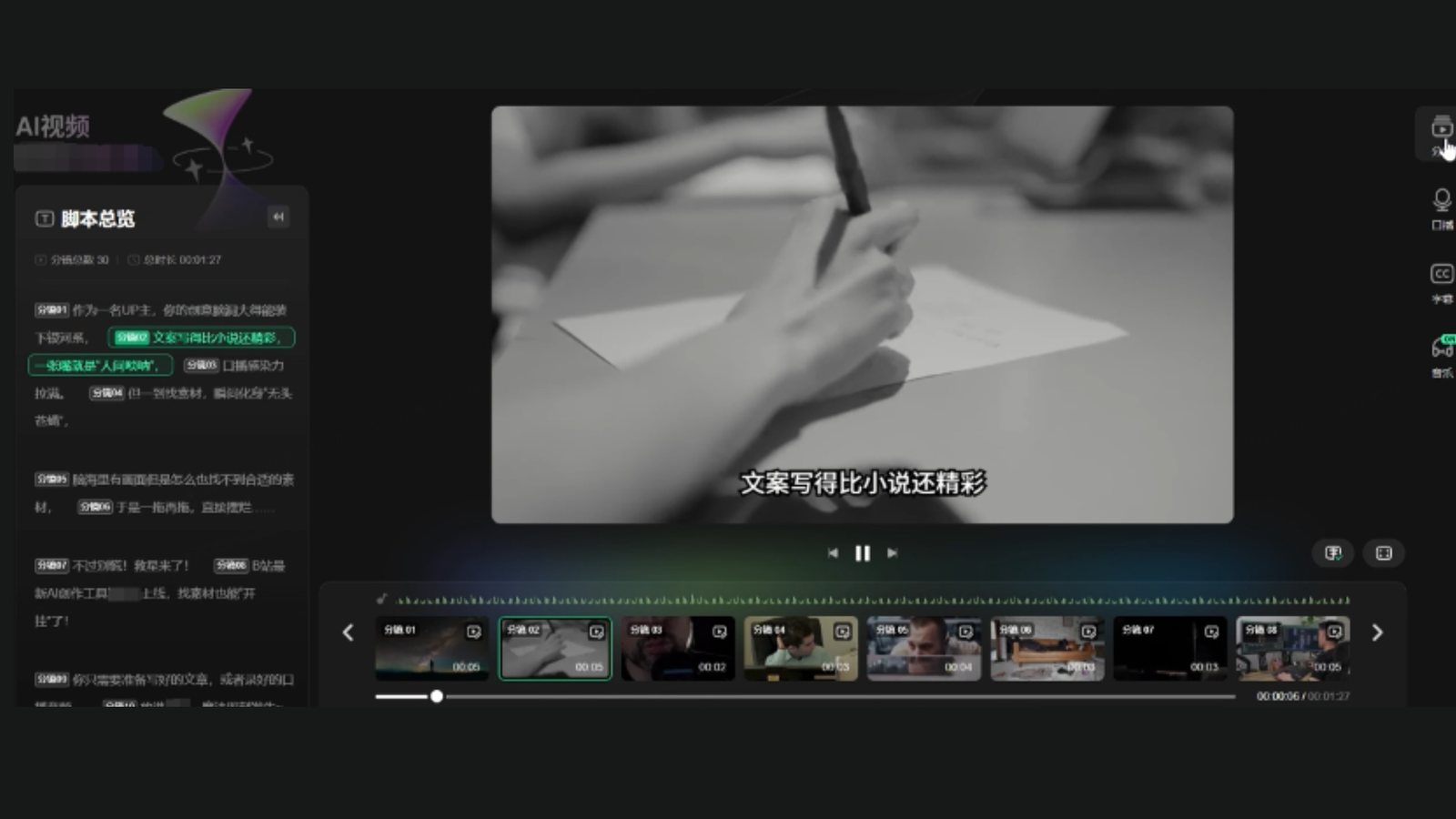
But the real star of Bilibili’s strategy is their upcoming AI creation tool, internally dubbed “Codename H.” This isn’t just another AI assistant – it’s specifically designed to tackle the most time-consuming aspect of video podcast production: finding and editing visual content.
Bilibili Codename H
How “Codename H” Works Its Magic
The AI tool accepts two input formats: written scripts and audio recordings. Creators simply upload their content, and the system automatically generates relevant visuals, graphics, and supporting materials. Currently, it can process 1,000 words of content in just six minutes, with plans to reduce that to three minutes.
Imagine spending hours searching for the perfect image to illustrate your point about market trends, only to have AI deliver exactly what you need in seconds. That’s the promise of Codename H.
The tool supports two main templates:
- Podcast format: Optimized for conversational content with dynamic visual elements
- Knowledge-sharing format: Designed for educational content with informative graphics and charts
Early feedback from beta testers has reportedly exceeded expectations, suggesting the tool genuinely solves real creator pain points rather than just adding unnecessary complexity.
Why This Matters for Content Creators
The Productivity Revolution
Video podcast creation typically involves multiple steps: recording, editing, visual research, graphic design, and post-production. Codename H collapses several of these steps into an automated process, potentially reducing production time by 60-70%.
For creators juggling multiple projects or those just starting out, this efficiency gain could be the difference between sustainable content creation and burnout.
Lowering the Technical Barrier
Not everyone’s a video editing expert, and that’s okay. Bilibili’s approach recognizes that great content creators shouldn’t need to become technical wizards to succeed. By handling the visual heavy lifting, creators can focus on what they do best: creating compelling, valuable content.
The Bigger Picture: Bilibili’s 2025 Vision
This video podcast push fits into Bilibili’s broader 2025 strategy, which includes strengthening AIGC capabilities, improving conversion rates, and expanding advertising automation. The company is also testing “B Mini Programs” in gaming, with plans to expand into short dramas and novels.
What’s particularly smart about this approach? Instead of competing directly with established platforms on their strengths, Bilibili is creating new categories where they can lead from the front.
The integration of AI tools with creator support services suggests a platform that understands modern content creation challenges. Rather than just providing hosting, Bilibili is building an ecosystem that nurtures creator success.
What This Means for the Future
The success of Bilibili’s video podcast strategy could influence how other platforms approach creator support. We might see more platforms offering integrated AI tools, physical resources, and targeted growth support rather than just hosting services.
For creators, this represents a shift toward platforms that actively invest in their success rather than leaving them to figure everything out independently. The combination of AI assistance, physical resources, and traffic support creates a compelling value proposition that could attract creators from competing platforms.
Key Point
Bilibili’s comprehensive video podcast strategy, anchored by the innovative Codename H AI tool, represents more than just another platform update. It’s a fundamental reimagining of how platforms can support creator success through integrated technology, resources, and growth strategies.
Ready to explore how AI-powered content creation could transform your own projects? The video podcast revolution is just beginning, and platforms like Bilibili are showing us what’s possible when technology truly serves creativity.





 AI News8 months ago
Google Expands Firebase Studio with AI Tools for Popular Frameworks

 AI News9 months ago
Turn Photos into Videos Using Google Gemini AI
- AI News9 months ago
Apple New AI Model Can Detect Pregnancy With 92 percent

 AI Tutorial9 months ago
How to Turn Off Microsoft AI Features
- AI News8 months ago
YouTube rolls out new AI-powered tools for Shorts creators
- AI News9 months ago
OpenAI has now restored the services after outage
- AI News9 months ago
Google hires Windsurf execs in $2.4 billion deal
- AI Tools9 months ago
Is This Simple Note-Taking App the Future of AI?